Snapchat
- 4.2
- Rating
- 1.00B
- Installs
- Free
- Price

 Analysis by App-foxy
I came away from Snapchat thinking less about it as a replacement for ordinary messaging and more as a different social rhythm. It is built around quick visual updates, informal reactions, and conversations that feel lighter than a carefully written message. That makes it unusually good for staying close to people throughout the day, but it can also make communication feel scattered when you need clarity, a reliable record, or a calm place to focus.
As a free communication app from Snap Inc, it has grown far beyond a niche camera tool. It has over a billion installs and an average rating of 4.2 from around 39 million ratings, which reflects how familiar it has become while also hinting that its appeal is not universal. I found it most enjoyable when I treated it as a place for spontaneous contact rather than as my main inbox.
Why Snapchat feels different from ordinary messaging
The central idea is simple: share what is happening now instead of composing a polished update later. A photo of a badly made lunch, a short clip from a walk, or a quick face-to-camera message can carry more personality than a sentence typed into a conventional chat. The camera is not just an extra feature here; it is the starting point for much of the experience.
In-Depth Coverage of Snapchat
That approach changes the pressure around communication. In a standard messaging app, I often feel that a message deserves a complete answer. On Snapchat, a picture or brief video can stand on its own. A reaction, another image, or a small visual joke may be enough to keep the exchange moving. For friends who dislike formal conversation, this lowers the effort needed to say, “I am thinking of you.”
The trade-off is that the app can make every moment feel potentially shareable. When I opened it with no specific purpose, it was easy to move from replying to a friend into browsing other updates and camera-based content. The experience rewards immediacy, so it is strongest for people who enjoy a steady stream of small interactions rather than occasional, carefully organized conversations.
Conversation that moves in pictures
Snapchat works especially well for groups of friends who already understand one another’s humor and habits. A photo can provide context instantly: where someone is, what they are eating, or what has just gone wrong. That visual shorthand often avoids the back-and-forth needed to explain a situation in text.
I also noticed that the app makes low-stakes contact easier. Sending a quick update does not feel like opening a serious discussion, so people may communicate more often. This is useful for long-distance friendships, family members who enjoy casual check-ins, or couples who want to share fragments of a day without writing a full diary entry.
Still, visual shorthand is not always clear. A message that seems funny to the sender can be confusing without tone or background. If a conversation involves plans, instructions, an address, a deadline, or anything emotionally sensitive, I would move it to a more conventional chat or write the details plainly. Snapchat’s speed is an advantage until the conversation needs precision.
Stories, direct messages, and the shape of a day
The app combines personal exchanges with a broader stream of updates. That creates a useful middle ground between a private message and a public post. I can share a moment with selected friends, follow what people are doing, and answer privately when something catches my attention. The result feels less formal than a social network built around permanent posts.
For me, Stories are best understood as a way to give friends a loose outline of the day. They can reduce the need to send the same update individually, but they also change how people keep up with one another. Instead of asking directly, someone may assume that the answer is already visible in a Story. That can be convenient, though it may also replace a more meaningful conversation with passive viewing.
One practical habit helps: I try to decide whether I am opening the app to contact somebody or simply to browse. Those are different activities, but Snapchat places them close together. Going in with a clear reason makes the experience feel social; opening it automatically can turn a short check-in into a longer attention loop.
Creative tools that make ordinary updates feel personal
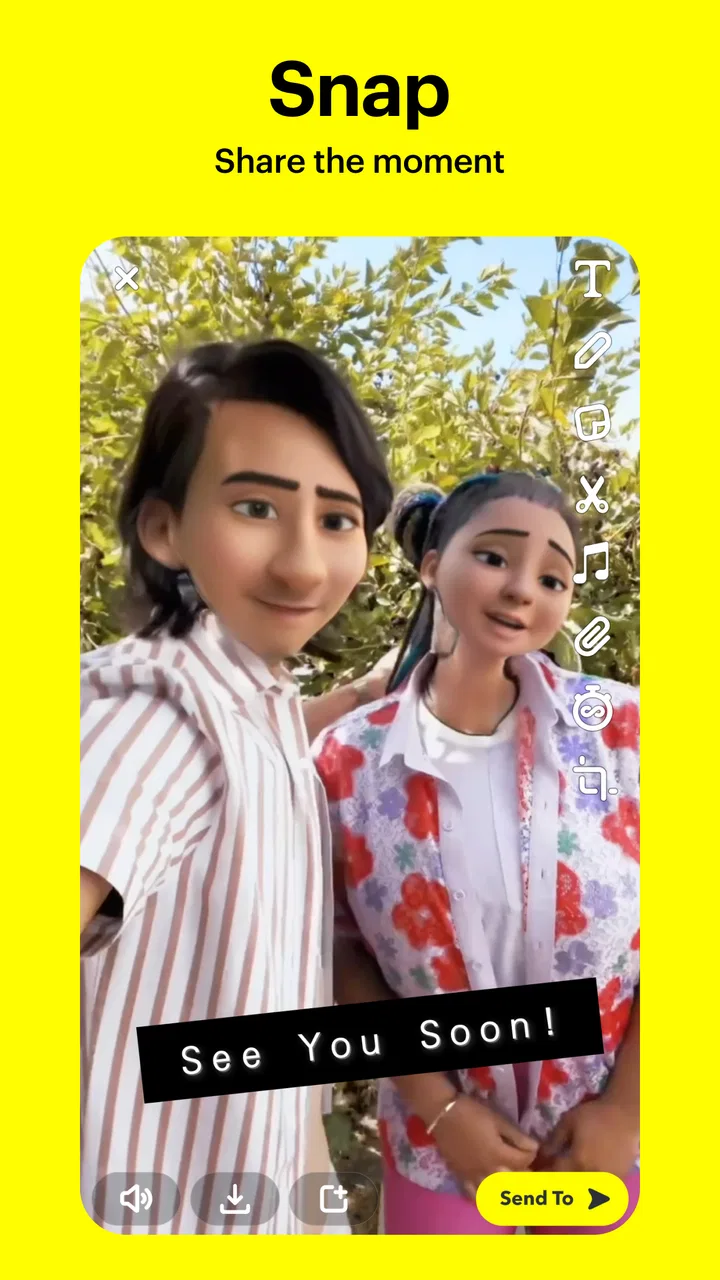
The camera tools are a major reason the app remains distinctive. Lenses, effects, text, drawing, stickers, and quick editing options let me turn a routine photo into something expressive without needing a separate editor. The best results are not necessarily the most elaborate ones. A small caption or playful effect can give a familiar update a recognizable voice.
There is also a useful social benefit to this creativity: it gives people something to respond to. A plain “How is your day?” can feel demanding, while a funny image invites an easy reaction. I found that visual prompts often keep a conversation alive when neither person has a major story to tell.
However, the creative layer can become a distraction from the person behind the message. If every exchange is filtered, decorated, or optimized for a reaction, the app may encourage performance instead of connection. I prefer using the tools when they add context or humor, not because every image needs to look impressive.
Attention, boundaries, and everyday control
I find that control starts with deciding what each interaction is for: a quick reply, a shared moment, or simply browsing. Keeping those purposes separate can make Snapchat feel more intentional, especially when a lively feed competes with focused time. From there, the next question is how to set boundaries around audience and attention without losing the casual, friendly exchange that makes the app appealing.
You May Also Like

 Pandora - Music & Podcasts
Pandora’s Music Is Easy to Start, but Harder to Recover
Pandora’s strength is its low-effort path from a seed to a station. Its weak spot is how much confidence it asks you to place in connection, setup, and quiet recovery.

 8 Ball Pool
8 Ball Pool Is Built on Rivalries, Rematches, and Routine
A close look at the rivalries, rematches, shared routines, and unanswered safety questions that turn a quick pool match into a persistent mobile community.

 Samsung Music
Samsung Music’s Quiet Strength Is Playing What You Already Own
Its reach comes less from spectacle than from dependable access to a personal library. That simplicity is both the app’s strongest retention engine and its ceiling.

 AccuWeather: Weather Radar
AccuWeather Review: A Quick, Clear Forecast for Everyday Decisions
For everyday plans, the best forecast is the one you can understand quickly. AccuWeather makes rain timing, radar, and local conditions easy to act on, with a few trade-offs.

 Hill Climb Racing
Why Hill Climb Racing Still Turns Crashes Into One More Run
A tiny car, a bumpy hill and one more upgrade: Hill Climb Racing keeps resurfacing because its simple chaos makes every near-miss feel personal.

 AliExpress - Shopping App
AliExpress Makes Global Shopping Feel Personal, but Shoppers Bear the Risk
AliExpress turns a global marketplace into a pocket-sized discovery engine. Its reach is useful, its shopping loop compelling, and its trade-offs easy to miss.
More From Our News Desk



The cost of an always-current feed
The app’s greatest strength is also its main attention problem: it makes communication feel immediate. That immediacy is pleasant when I am waiting for a friend’s update, but it can make the phone feel socially active all the time. A new message, a fresh Story, or an interesting visual prompt can pull me back before I have decided whether I actually want to engage.
Snapchat is therefore a poor fit for someone trying to reduce visual scrolling or keep messaging strictly task-based. It is designed around presence and novelty, not around a clean list of responsibilities. I would not choose it as my only communication tool for work, school coordination, appointments, or conversations where I need to search back through a dependable history.
There is a difference between being reachable and being available. The app makes it easy for friends to send something at any moment, but responding immediately is not a social obligation. I had a better experience when I treated replies as something I could batch rather than as alerts demanding instant attention.
Boundaries for privacy and social pressure
The Teen content rating is worth taking seriously, especially for younger users and families deciding how the app should fit into daily life. The casual style can make interactions feel harmless, but informal communication still needs boundaries. I would talk with younger users about who they share with, what they are comfortable receiving, and what to do when a conversation becomes uncomfortable.
A useful rule is to pause before sending anything that would be upsetting if it were misunderstood, saved, or shown outside the intended conversation. The app’s disappearing-message culture can create a sense of reduced permanence, but it should not be treated as a guarantee that a moment has no lasting consequences. Good judgment matters more than the temporary feeling of the interface.
I also recommend separating close-friend communication from broad audience sharing. The more people who can see an update, the less control I feel over its context. Keeping the audience intentional makes the app feel more like a private social tool and less like a stage.
What the subscription and purchase layer changes
The app is free to download and use, but it includes optional in-app purchases ranging from under a dollar to several hundred dollars per item. That wide range means I would be careful around any purchase prompts and make sure younger users understand that free access does not mean every extra is free.
For my everyday use, the basic communication experience is the important part. I would not install it expecting that payment is necessary to understand how friends are communicating. If someone is mainly interested in sending visual messages and keeping up with a small circle, the free entry point is enough to judge whether the rhythm suits them before spending anything.
A realistic day with Snapchat
Imagine a normal weekday: a friend sends a picture of a crowded train, I reply with a quick image from my desk, and later a family member shares a short update from dinner. None of these exchanges needs a formal paragraph. The app makes those small moments feel connected, and the conversation can continue naturally without asking anyone to stop and write a complete report.
But if that same group is arranging travel, the limitations appear quickly. Important details can become buried among images and reactions, and a visual reply may not answer the actual question. I would use Snapchat to keep the mood friendly, then move the final itinerary or exact plan into a clearer channel. That combination plays to the app’s strength without asking it to do a job it was not built to handle well.
How it compares with familiar alternatives
Compared with a traditional text messenger, Snapchat feels more immediate and expressive but less dependable for reference. Text-first apps are usually better when I need to find an old instruction, copy information, or keep a conversation organized. Snapchat wins when the goal is to share atmosphere rather than preserve a record.
Compared with a photo-centered social network, it feels more conversational and less focused on presenting a finished public identity. The camera and visual effects are central, but the strongest moments often happen between friends rather than in front of a broad audience. That makes it attractive to people who want social sharing without turning every update into a polished post.
Compared with a private, security-focused messenger, Snapchat is more playful and spontaneous but is not the option I would reach for when privacy, permanence, and detailed control are the main priorities. The right choice depends on the conversation: casual visual contact benefits from Snapchat, while sensitive or highly practical communication deserves a tool designed around clarity and secure record-keeping.
Small habits that improve the experience
I found three habits particularly helpful. First, I use visual messages for context and emotion, but switch to plain text when a detail must not be misunderstood. Second, I check the intended audience before posting rather than assuming the last setting is still appropriate. Third, I avoid opening the app during focused work unless I am expecting a specific reply.
Another useful workflow is to record a quick visual thought, add just enough text to explain it, and send it directly instead of polishing it for a wider audience. This keeps the app personal and reduces the pressure to perform. For group planning, I use Snapchat for the informal discussion and a more structured tool for the final facts.
These habits also answer a common concern: can Snapchat be used without letting it take over the day? Yes, but only if I create the boundary myself. The app’s design encourages return visits, so notification choices, deliberate checking times, and a clear distinction between replying and browsing make a noticeable difference.
Who should use it, and who should skip it
I would recommend Snapchat to friends who communicate through humor, images, quick reactions, and frequent small updates. It is a strong choice for people who want a more lively alternative to plain texting, especially when their close circle already uses it. Its huge community makes it easier to find existing contacts there, and the free price removes much of the risk of trying it.
I would be more cautious if you want a quiet inbox, a permanent archive, or communication that stays focused on tasks. People who are easily pulled into feeds may find the constant stream tiring. I would also skip it as a primary tool for professional conversations, detailed planning, or situations where every participant needs the same clear written record.
Performance, access, and practical expectations
The current version is 13.95.0.44, and the app supports Android 6.0 and later. That broad compatibility makes it accessible on many older Android devices, although the camera-heavy experience will naturally feel better on a phone with a responsive camera and enough space for regular media use.
Snapchat was released on October 29, 2012, and its long presence helps explain why it has developed a communication style of its own rather than simply copying ordinary messaging. I would still spend a little time learning where conversations, Stories, camera tools, and account controls live, because the interface prioritizes discovery and visual actions over a simple list of text threads.
On iOS and Android, the basic idea remains the same: use the camera to share a moment, respond quickly, and keep contact informal. The exact feel will depend on the phone and operating system, but the important decision is not technical. It is whether you want communication to be fast, visual, and woven into your daily attention.
My final view after using it
Snapchat succeeds because it makes ordinary contact feel easy. It turns a passing moment into a message and gives friends a reason to respond without demanding a serious conversation. I like it most when I use it as a lightweight layer of friendship: a place for jokes, glimpses, reactions, and updates that would otherwise never be shared.
At the same time, I would not let its disappearing, playful atmosphere make me careless. The app can blur the line between communicating and consuming, and it is not the clearest place for important information. My honest recommendation is to use it alongside a more practical messenger, not instead of one.
Snapchat is at its best when it adds warmth without adding pressure. If your friends already enjoy visual conversation and you can set limits around browsing, the free app is worth trying. If you need calm, searchable, precise communication, another option will serve you better. Its real value is not that it handles every kind of message, but that it makes small everyday moments feel worth sharing.
FAQs for Snapchat
01What is Snapchat and how does it work?
Snapchat is a multimedia messaging app available on Android and iOS that allows users to send photos, videos, and messages that disappear after being viewed. It features Stories, which are visible for 24 hours, and Snap Map, where users can share their location. The app also includes various lenses and filters for creative expression.
02Is Snapchat free to use?
Yes, Snapchat is free to download and use. However, it offers in-app purchases for additional features like custom lenses and filters. Some data or network charges may apply depending on your mobile plan, especially when using features that require a high amount of data, such as video snaps and live stories.
03How secure is my data on Snapchat?
Snapchat uses encryption to protect your data, but it's important to remember that no app can be 100% secure. Users should be cautious about what they share. While snaps disappear, the app warns users that recipients can still take screenshots or use third-party apps to save content without your knowledge.
04What are Snapchat Streaks and how do they work?
Snapchat Streaks occur when two users send snaps back and forth for consecutive days. A streak begins after three days of snapping, and a fire emoji appears next to the contact's name with a number indicating the streak's length. Maintaining streaks can be a fun challenge but requires daily interaction.
05Can I use Snapchat for professional purposes?
While Snapchat is primarily used for personal communication, businesses can leverage it for marketing by creating engaging content. Companies often use Snapchat to reach younger audiences through creative ads, influencer partnerships, and unique content that showcases brand personality. However, it's less formal than platforms like LinkedIn.
Pros
- Fun filters enhance photos creatively.
- Easy to connect with friends instantly.
- Stories feature keeps content fresh.
- Privacy controls for content sharing.
- Discover section offers engaging content.
Cons
- Limited storage for older messages.
- Some features drain battery quickly.
- Occasional glitches in video playback.
- Privacy concerns with data sharing.
- Ads can be intrusive at times.

Snapchat
Gallery